Running Apache MiNiFi as a Windows Service
This post was originally published on Medium and moved here later. The diagram was added and the post updated during the move.
Apache NiFi is a dataflow tool. You open a web UI, drag processors onto a canvas, wire them together, and you have something that moves data between systems with retries, back pressure, and prioritized queuing handled for you rather than written by you. It came out of the NSA, was donated to the Apache Software Foundation in 2014, and has been a top level project since 2015.
The part people tend to underrate is provenance. NiFi tracks every piece of data moving through a flow and records what happened to it along the way, so when somebody asks where a particular record came from and what touched it on the way through, there’s an actual answer. That accounts for a lot of why NiFi turns up in regulated environments.
It is also a full JVM application with a web server attached, and it expects a real machine to live on. That’s fine in a data center. It’s no help at all on the sensor, the branch office box, or the laptop where the data is actually being produced.
Which is what MiNiFi is for. Same ideas, no canvas, much smaller footprint. You install it where the data is, it runs a flow described in a YAML file instead of drawn in a browser, and it sends what it collects back to a full NiFi instance over site to site. There are two implementations, one in Java and one in C++ for devices where a JVM is more than you can ask for. This post is about the Java one.
The usual way to work with it is to build the flow in NiFi’s UI where you can see what you’re doing, then convert that template into MiNiFi’s YAML config and push it out to the agents.
Plenty of the machines you’d want to put an agent on run Windows.
Up to now, running MiNiFi on Windows meant opening a console and leaving it open. Which is fine until somebody logs off, or the box reboots at 3am for updates and nothing is collecting anything until somebody notices.
So I spent some time making it run as an actual service. It’s in 0.3.0. Most of the work had nothing to do with Java, which I wasn’t expecting going in.
The commits:
- MINIFI-344 is the service itself.
- MINIFI-404 fixes how the binaries get there.
- MINIFI-409 deals with the tests.
Windows won’t just run your process
On Linux you write a unit file and systemd takes it from there.
Windows wants more from you. The Service Control Manager isn’t a thing that launches
executables and leaves. It sends the process control codes for start and stop and
shutdown, it expects answers, and it expects them inside a timeout. java.exe knows
nothing about any of that. Point the SCM straight at it and the service fails to start,
because from Windows’ side something launched and then never reported in, so it gets
killed.
The usual answer for Java projects is
Apache Commons Daemon. The part you
want is procrun, which is two binaries. prunsrv.exe is the service host that does the
real work and prunmgr.exe is a small GUI for poking at it. It being Apache licensed
helped, since this was going into an Apache project and license arguments eat weeks.
We ship them renamed as minifi.exe and minifiw.exe.
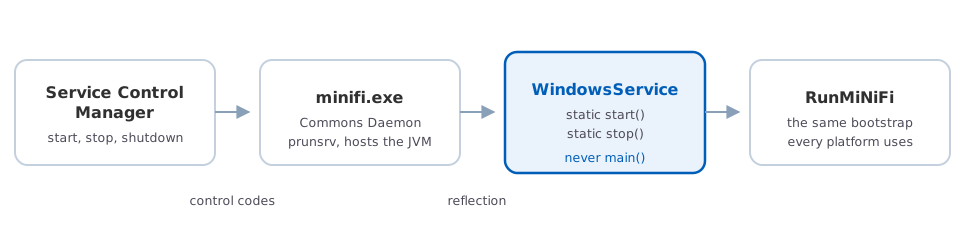
The chain from the Service Control Manager down to the ordinary MiNiFi bootstrap. The highlighted step exists only because procrun never calls main().
The glue class
procrun has a few modes. In jvm mode it loads a JVM inside the service process and calls
a static method you name in the config, which is faster than shelling out and gives you
a cleaner stop path. What it won’t do is call main().
Which is the only reason WindowsService exists. Forty lines that do nothing except
give procrun something to call.
public class WindowsService {

    private static RunMiNiFi bootstrap;

    public static void start(String[] args) throws IOException, InterruptedException {
        final File bootstrapConfigFile = RunMiNiFi.getBootstrapConfFile();
        bootstrap = new RunMiNiFi(bootstrapConfigFile);
        bootstrap.start();
    }

    public static void stop(String[] args) throws IOException, InterruptedException {
        bootstrap.setAutoRestartNiFi(false);
        bootstrap.stop();
    }

}
That static field is ugly. It’s also required, since start and stop arrive separately and both have to get at the same bootstrap object.
The only existing code I touched was making RunMiNiFi.getBootstrapConfFile() public
instead of private. The service class needs to find bootstrap.conf the same way the
regular launcher finds it, and the alternative was copying that lookup into a second
place where it would eventually disagree with the first.
Installing it
One call to procrun with a lot of arguments. Trimmed to the interesting ones:
set SRV_BIN=%cd%\minifi.exe
set SVC_NAME=minifi
set START_CLASS=org.apache.nifi.minifi.bootstrap.WindowsService
set START_METHOD=start
set STOP_CLASS=org.apache.nifi.minifi.bootstrap.WindowsService
set STOP_METHOD=stop
set CLASS_PATH="%CONF_DIR%";"%MINIFI_ROOT%lib\*";"%MINIFI_ROOT%lib\bootstrap\*"

"%SRV_BIN%" //IS//%SVC_NAME% ^
--DisplayName=%SVC_DISPLAY% ^
--Install="%SRV_BIN%" ^
--Jvm="%JVM%" ^
--StartMode="jvm" ^
--StopMode="jvm" ^
--StartClass="%START_CLASS%" ^
--StartMethod="%START_METHOD%" ^
--StopClass="%STOP_CLASS%" ^
--StopMethod="%STOP_METHOD%" ^
--Classpath="%CLASS_PATH%" ^
--JvmOptions="%JAVA_ARGS%" ^
--LogPath="%LOG_PATH%"
//IS// installs and //ES// starts, and the script does the second right after the
first. delete-service.bat is the same thing backwards with //DS//.
JvmOptions carries the system properties the bootstrap reads for its log directory, pid
directory, and bootstrap.conf path. Those are separated with semicolons, not spaces. I
found that out the way you’d expect.
Relative paths ate my afternoon
bootstrap.conf ships with relative paths.
lib.dir=./lib
conf.dir=./conf
nifi.minifi.config=./conf/config.yml
Which works when you start MiNiFi from its install directory, and that’s what everybody
does by hand, so nobody had hit this. A service doesn’t. The SCM hands it a working
directory that has nothing to do with where you unpacked things, ./lib and ./conf
end up pointing somewhere under the Windows directory, and the service dies immediately
without telling you much about why.
No trick to this one. Running as a service means absolute paths. I put comments in
bootstrap.conf and added a section to the admin guide, because the error you get is not
a helpful error.
I checked binaries into an Apache repo
The first version of this worked. It was also wrong.
I committed prunsrv.exe and prunmgr.exe into the source tree under their new names,
and that is not how Apache releases work. Source releases are supposed to build from
source. Third party binaries sitting in the repository aren’t allowed, and they shouldn’t
be, because nobody reviewing a release can tell you what’s actually in them. It’s asking
people to trust an executable based on which folder it turned up in.
So they came back out and the build fetches them now. An antrun step in the resources pom runs at compile time, downloads the Commons Daemon zip, checks it, and pulls the two binaries out of it.
<get src="http://www.apache.org/dist/commons/daemon/binaries/windows/commons-daemon-1.0.15-bin-windows.zip"
     dest="${java.io.tmpdir}/commons-daemon-1.0.15-bin-windows.zip"
     skipexisting="true" />
<property name="sha256sum" value="f46d87be0997b5c0f5c3a340ee8addca04cb2a32b2dc3e3a9e89a592ccf6abed" />
<checksum file="${java.io.tmpdir}/commons-daemon-1.0.15-bin-windows.zip"
          algorithm="SHA-256" property="${sha256sum}" verifyProperty="checksum.matches" />
<condition property="checksum.matches.fail">
    <equals arg1="${checksum.matches}" arg2="false" />
</condition>
<fail if="checksum.matches.fail">Checksum error</fail>
The version is pinned, the checksum is pinned, and a mismatch stops the build instead of printing a warning nobody reads. If you’re going to pull something off the network during a build, be specific about what you expect to get back.
*.exe went into .gitignore so the old ones can’t wander back in. There’s also a guard
that skips the whole step if the binaries are already there, which keeps rebuilds and
offline builds off the network.
Then the tests
Once the build was producing something that ran on Windows, running the test suite there became worth doing. The persistent provenance repository tests failed.
They aren’t really Windows tests. They assume you can delete a file that’s still open, which is true on Linux and isn’t on Windows. I skipped them there so builds could go green.
That’s not a fix and I’m not going to pretend it is. The repository code probably has the same assumption sitting in it somewhere and deserves a proper look from someone. But a project that won’t build on Windows is worse than a project with a skipped test and a ticket number.
Looking back at it
The Java was the easy part. Forty lines, one afternoon.
Everything else was service lifecycle rules, working directory assumptions, an Apache policy I had to go read, and the question of how you distribute a binary you didn’t compile yourself. I suspect that’s what most cross platform work actually looks like.
If you’re running MiNiFi on Windows, install-service.bat is in bin as of 0.3.0. Read
the part about absolute paths first.
If you’re working on data collection at the edge and want to talk it through, please reach out.