Understanding OpenSearch User Behavior Insights (UBI)
If you want to improve search relevance, the most valuable data you have isn’t in your index. It’s in what your users do. Every query they type, every result they click, and every result they scroll past and ignore is a signal about what they were actually looking for. The problem is that most search systems throw all of that away.
OpenSearch User Behavior Insights, or UBI, is a project that fixes that. It gives you a standard way to capture user behavior alongside your search traffic so you can use it to measure and improve relevance. I’m a maintainer on the project, and this post is a plain-language introduction to what it is and why it matters.
The problem: implicit feedback is hard to capture
There are two kinds of feedback you can get about search quality.
Explicit feedback is when someone tells you a result is good or bad, usually through a human judgment or a thumbs-up/thumbs-down. It’s accurate but expensive, slow, and it doesn’t scale. You’ll never have humans rate more than a tiny slice of your queries.
Implicit feedback is the behavior you already generate for free: searches, clicks, add-to-carts, purchases, dwell time. It’s noisy, but there’s an enormous amount of it, and it reflects what real users actually did rather than what a rater thinks they should have done.
The catch is that implicit feedback is only useful if you can tie it together. A click is meaningless unless you know which query produced the result that was clicked, where that result was ranked, and what happened next. Capturing that chain of events consistently, across a search box on the front end and a search engine on the back end, is the hard part. That’s the gap UBI fills.
What UBI actually is
UBI has two halves that work together.
The first is a specification, an agreed-upon schema for two kinds of data:
- Queries are the search request itself, along with an identifier that links it to the results it returned and to the user or session that made it.
- Events are everything the user does afterward: clicking a result, adding an item to a cart, paging to the next set of results, or any other action you care about. Each event carries the identifiers needed to connect it back to the query that started it.
Because it’s a specification and not just a plugin, UBI is a standard rather than a one-off implementation. Front-end code, back-end code, and downstream analytics can all agree on the same structure. You can read the full specification and documentation at ubisearch.dev.
The second half is the OpenSearch implementation that stores this data. Query and event signals are persisted into OpenSearch indexes, which means you can query and aggregate your behavioral data with the same tools you already use for everything else.
Why linking queries to events is the whole point
The single most important idea in UBI is the identifier that connects a query to the events that follow it.
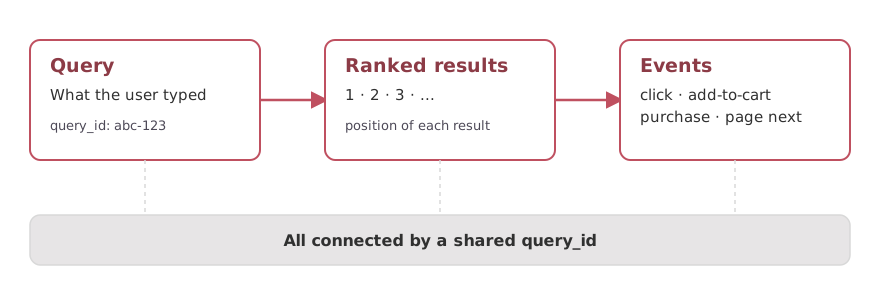
UBI ties a query, the results it returned, and everything the user did next together with a shared query id.
Once every event can be traced back to the query that produced it, along with the specific result and its rank position, you can answer questions that were previously guesswork:
- Which queries return results nobody clicks?
- Which results get clicked even though they’re buried on page two?
- Where does a query produce zero results and a frustrated user?
- Did a relevance change actually make users click higher-ranked results more often?
Those answers are the raw material for everything else.
What you can do with the data
Once you’re capturing behavior in a consistent structure, a lot opens up.
Learning-to-rank models are trained on implicit signals. Clicks, conversions, and skips can be turned into judgments that teach a model which results users prefer, without a team of human raters labeling everything by hand.
A/B testing becomes reliable. When you change your relevance configuration, UBI data lets you measure whether the new version actually performs better on real user behavior, not just on a handful of test queries.
Relevance analytics are simple to produce. Zero-result queries, low-engagement queries, and popular searches all fall out of the data naturally, so you can find the worst-performing parts of your search experience and fix them first.
A feedback loop emerges. The real payoff is that these pieces reinforce each other. Behavior trains models, models change ranking, and UBI measures whether ranking got better, which produces more behavior to learn from.
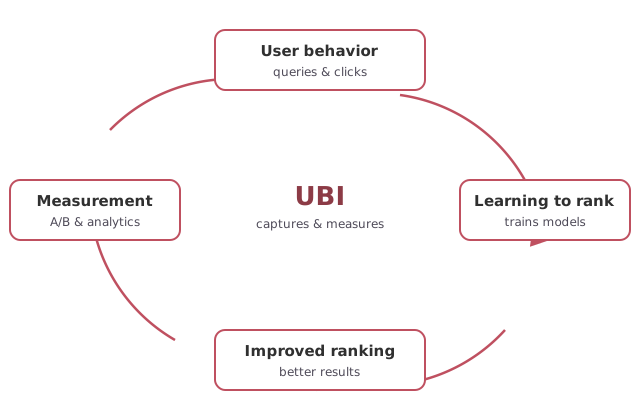
Each piece feeds the next: behavior trains models, models improve ranking, and UBI measures the result.
Getting started
The best place to start is the specification and documentation at ubisearch.dev, which walks through the query and event schemas and how the pieces fit together. The code, issues, and releases live in the user-behavior-insights repository on GitHub. It’s an active, community-driven project, and contributions and questions are welcome.
Summary
Your users are constantly telling you what they want through what they search for and what they click. OpenSearch UBI gives you a standard, structured way to capture that implicit feedback and connect it back to the queries that caused it. That connected data is what powers learning-to-rank, A/B testing, and honest relevance measurement: the difference between guessing at search quality and actually knowing.
If you’re working on search relevance and want to talk through how UBI could fit into your stack, please reach out.