Automating NLP Model Training with Apache OpenNLP and Apache NiFi
Training an NLP model is easy to treat as a one-off task: grab some data, run a training command, save the model, and move on. That works right up until the data changes, the model goes stale, and you find yourself repeating the whole manual process every few weeks and hoping you did it the same way as last time.
A better approach is to treat model training like any other data flow: automated, repeatable, and observable. That’s the idea behind opennlp-nifi, a set of Apache NiFi processors that use Apache OpenNLP to handle the full model lifecycle.
Why NiFi for model training?
Apache NiFi is built for moving and transforming data through directed flows, with scheduling, retries, back-pressure, and data provenance built in. Those are exactly the properties you want around model training. Instead of a script someone runs by hand, you get a flow that can pull fresh training data on a schedule, retrain a model, check whether it’s actually good, and deploy it only if it meets your bar. When the training data changes, the pipeline keeps your model current on its own.
The pipeline
The processors are designed to chain together into a complete training pipeline:
- Retrieve the training data (using NiFi’s existing processors, from wherever your data lives).
- Convert it to the format OpenNLP expects.
- Train a model on that data.
- Evaluate the trained model.
- Deploy the model, but only if it meets the thresholds you set.
That last step is the important one. You don’t want to automatically ship a model that came out worse than the one already in production, so deployment is conditional on the evaluation results.
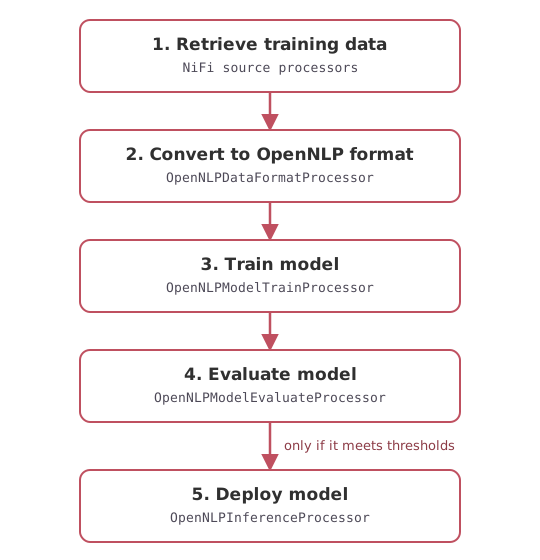
The pipeline as a NiFi flow, one processor per stage.
The processors
The repository provides four OpenNLP processors, one for each job in that pipeline:
- OpenNLPDataFormatProcessor converts incoming training data into the OpenNLP training format.
- OpenNLPModelTrainProcessor trains an OpenNLP model from that formatted data.
- OpenNLPModelEvaluateProcessor evaluates the trained model so you can measure its quality.
- OpenNLPInferenceProcessor runs inference with a model, which is also how you confirm a deployed model behaves as expected.
Because these are ordinary NiFi processors, you drop them onto the canvas and wire them together like anything else in NiFi. The routing between “evaluate” and “deploy” is just a NiFi relationship, so the conditional deployment logic lives right there in the flow where you can see it.
Each processor is a small, focused piece of code. Here’s the core of the training
processor, trimmed to the essentials. Notice the TRAINED and FAILURE
relationships: those are the outgoing routes you wire to the next stage in the
flow, which is exactly how the conditional deployment logic is expressed.
@Tags({"opennlp"})
@CapabilityDescription("Trains an Apache OpenNLP model")
public class OpenNLPModelTrainProcessor extends AbstractProcessor {

    public static final Relationship TRAINED = new Relationship.Builder()
            .name("TRAINED").description("Model successfully trained").build();

    public static final Relationship FAILURE = new Relationship.Builder()
            .name("FAILURE").description("Failure while training model").build();

    @Override
    public void onTrigger(final ProcessContext context, final ProcessSession session) {
        FlowFile flowFile = session.get();
        if (flowFile == null) {
            return;
        }

        try {
            final String trainingDataFile = context.getProperty(TRAINING_DATA).getValue();
            final InputStreamFactory in = new MarkableFileInputStreamFactory(new File(trainingDataFile));
            final ObjectStream<NameSample> sampleStream =
                    new NameSampleDataStream(new PlainTextByLineStream(in, StandardCharsets.UTF_8));

            final TrainingParameters params = new TrainingParameters();
            params.put(TrainingParameters.ITERATIONS_PARAM, 3);
            params.put(TrainingParameters.CUTOFF_PARAM, 1);

            final TokenNameFinderModel model = NameFinderME.train("en", null, sampleStream,
                    params, TokenNameFinderFactory.create(null, null, Collections.emptyMap(), new BioCodec()));

            final String modelOut = context.getProperty(OUTPUT_MODEL_FILE_NAME).getValue();
            model.serialize(new File(modelOut));

            session.putAttribute(flowFile, "model_file", modelOut);
            session.transfer(flowFile, TRAINED);

        } catch (Exception ex) {
            getLogger().error("Unable to train model", ex);
            session.transfer(flowFile, FAILURE);
        }
    }
}
Building and installing
The project builds with Maven into a NiFi Archive (NAR):
mvn clean package
Copy the built NAR into your NiFi installation’s lib/ directory:
cp ./nifi-opennlp-nifi-nar/target/nifi-opennlp-nifi-nar-0.0.1.nar /path/to/nifi/lib
Restart NiFi, and the OpenNLP processors will be available to use in your flows.
Why this matters
Keeping a model fresh is a big part of what makes NLP useful in production, and it’s the part that most often gets neglected because doing it by hand is tedious. Putting the training lifecycle into a NiFi flow turns “retrain the model” from a manual chore into a scheduled, observable pipeline with a built-in quality gate. That’s the difference between a model that quietly decays and one that stays current as your data evolves.
The code is on GitHub. If you’re building NLP pipelines or trying to keep your models fresh in production, please reach out.