Indexing Your First Vectors in Elasticsearch 8
This post was originally published on Medium and moved here later. The diagram was added and the post updated during the move.
Vector search stopped being a plugin question this year. Lucene 9 added native support for indexing and searching dense vectors, Elasticsearch 8.0 exposed it through a kNN search API in February, and Solr 9 is going to ship its own version shortly. If you’ve been putting off trying this because it needed a plugin or a separate vector database, that excuse has expired.
This is a walkthrough of doing it on Elasticsearch 8.1, which is what’s current as I write. I’ll go through getting embeddings, mapping the field, running a search, and the filtering problem that’s going to surprise you about an hour in.
Getting embeddings out of a model
You need something that turns text into a fixed length array of floats, and unless you have a strong reason to do otherwise, sentence-transformers is the least painful way to start. The models are small enough to run on a laptop and they’re trained for exactly this, which matters more than people expect. Taking the raw output of a generic BERT model and hoping it behaves like a similarity space is a common way to waste a week.
from sentence_transformers import SentenceTransformer

model = SentenceTransformer("all-MiniLM-L6-v2")
vector = model.encode("a movie about a heist gone wrong")

print(len(vector))  # 384
That model gives you 384 dimensions, which is a sensible size to start with. Elasticsearch caps indexed vectors at 1024 dimensions in 8.1, so if you were eyeing one of the larger models, check that number before you build a pipeline around it.
The mapping
The field type is dense_vector, and two of its settings matter considerably more than
the rest. Get those wrong and the symptom is usually that searches return nothing rather
than an error telling you why.
curl -X PUT "http://localhost:9200/movies" \
  -H 'Content-Type: application/json' -d '
{
  "mappings": {
    "properties": {
      "title": { "type": "text" },
      "overview": { "type": "text" },
      "genre": { "type": "keyword" },
      "overview_vector": {
        "type": "dense_vector",
        "dims": 384,
        "index": true,
        "similarity": "cosine"
      }
    }
  }
}'
"index": true is the one that catches people. Without it you get a field that stores
vectors and supports exact scoring but builds no HNSW graph, so the approximate search
API won’t touch it. The similarity setting picks how vectors get compared, and your
options are cosine, dot_product, and l2_norm. Match it to whatever your model was
trained with rather than picking one you like the sound of, and for sentence-transformers
that generally means cosine.
There’s also an index_options block where you can set the HNSW parameters m and
ef_construction. The defaults are reasonable and I’d leave them alone until you have a
measured reason to change them, since both of them trade index build time and memory
against recall.
Indexing is unremarkable once the mapping is right. You compute the vector in your application and send it as an array.
curl -X POST "http://localhost:9200/movies/_doc" \
  -H 'Content-Type: application/json' -d '
{
  "title": "The Italian Job",
  "overview": "A heist crew plans an elaborate gold robbery in Turin.",
  "genre": "Action",
  "overview_vector": [0.021, -0.113, 0.078, "... 381 more floats ..."]
}'
Running a search
In 8.1 approximate kNN lives at its own endpoint rather than inside the regular search body. That’s worth knowing before you go looking for examples, because this API is new enough that plenty of what you’ll find was written against a different shape of it.
curl -X GET "http://localhost:9200/movies/_knn_search" \
  -H 'Content-Type: application/json' -d '
{
  "knn": {
    "field": "overview_vector",
    "query_vector": [0.031, -0.092, 0.061, "... 381 more floats ..."],
    "k": 10,
    "num_candidates": 100
  },
  "fields": ["title", "genre"]
}'
k is how many results you want back and num_candidates is how many the graph walk
considers per shard on the way there. Raising num_candidates gets you better recall at
the cost of latency, and that dial is the whole approximation tradeoff sitting in one
number. Start around 100 and only touch it once you’re measuring something.
Filtering, and why it’s awkward
Here’s the part that will interrupt your afternoon. Approximate kNN in 8.1 does not support filters, so you cannot ask for the nearest vectors among documents where the genre is Action. The graph walk happens over the whole index and you get whatever it finds.
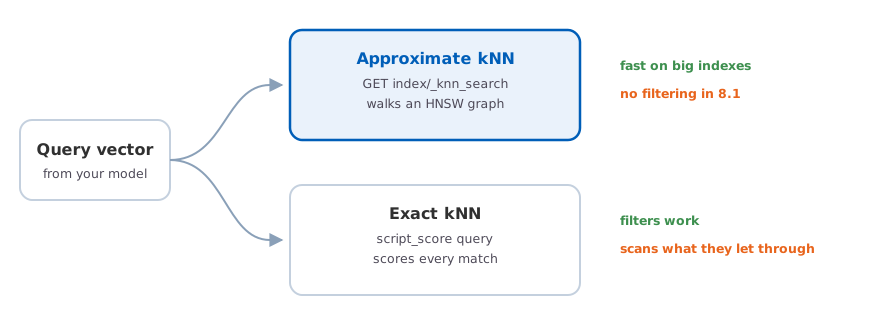
Two ways to search vectors in 8.1, and you pick based on whether you need a filter.
The workaround is exact kNN through a script_score query, where the filter runs first
and a similarity function scores whatever survives it. You give up the graph entirely and
get filtering in exchange.
curl -X POST "http://localhost:9200/movies/_search" \
  -H 'Content-Type: application/json' -d '
{
  "query": {
    "script_score": {
      "query": {
        "bool": {
          "filter": { "term": { "genre": "Action" } }
        }
      },
      "script": {
        "source": "cosineSimilarity(params.query_vector, \"overview_vector\") + 1.0",
        "params": {
          "query_vector": [0.031, -0.092, 0.061, "... 381 more floats ..."]
        }
      }
    }
  }
}'
The + 1.0 is there because Elasticsearch won’t accept negative scores and cosine
similarity runs from -1 to 1. It’s not a tuning parameter, it’s a shim, and you’ll see it
in every example of this.
What you’re doing here is scoring every single document the filter lets through, with no
graph to shortcut the work. On a narrow filter over a small index that’s completely fine.
On a filter that matches two million documents it is not fine at all, and you’ll feel it
immediately. The practical rule for now is that a selective filter can go through
script_score and a broad one needs you to rethink the query.
This is a known gap rather than a design decision, and I’d expect filtered approximate search to land in one of the next few releases. Until it does, plan your queries around it instead of discovering it in staging.
Did it actually beat BM25
Now the part everyone skips, which is checking whether any of this helped. It’s tempting to stop once the queries return sensible looking results, and that’s exactly where the trouble starts.
Vector search will return results for every query, including the ones it handles badly, and the results always look plausible enough that eyeballing a few of them tells you nothing. Meanwhile BM25 is still better than embeddings at exact terms, names, product codes, and anything a user copied and pasted, which happens to describe a large share of real queries.
Take fifty real queries from your logs, decide by hand which results should come back for each, and compute NDCG for your existing keyword search and for the vector search. It’s a day of dull work and it’s the only thing that turns this from an interesting demo into a decision. My expectation, which I’d encourage you to try to disprove, is that you’ll find each approach winning on a different slice of your queries and the honest answer being to run both and combine them.
The Solr version, shortly
If you’re on Solr rather than Elasticsearch, the same Lucene capability is arriving in
Solr 9
with a slightly different surface. You declare a DenseVectorField in your schema with a
vectorDimension and a similarityFunction, then query through a knn parser.
q={!knn f=overview_vector topK=10}[0.031, -0.092, 0.061, ...]
The interesting difference is filtering. Solr intersects the kNN result list with your
fq clauses, so fq=genre:Action works without dropping to a different query type. That
isn’t the same as filtering during the graph walk, and it can leave you with fewer than
topK results once the filter is applied, but it’s a good deal less awkward than the
Elasticsearch situation at the moment.
If you’re adding vector search to an existing index and want a second opinion on whether it’s the right move, please reach out.