Cloud Run, a Private MySQL, and Pub/Sub on Google Cloud
Cloud Run is one of my favorite cloud services to work with. You hand it a container, it hands you an HTTPS endpoint that scales to zero, and nobody on the team has to develop an opinion about node pools. The trouble usually starts a month in, when the application needs a real database and somebody points out that the database is not going to be sitting on the public internet.
That constraint is almost always right, and it’s also the point where the neat serverless story gets complicated. Cloud Run doesn’t run in your VPC, MySQL is going to be on a private IP inside one, and getting a connection between those two involves more moving parts than the marketing suggests. What follows is the arrangement I keep coming back to for this shape of application, along with the decisions inside it that decide whether it holds up under load.
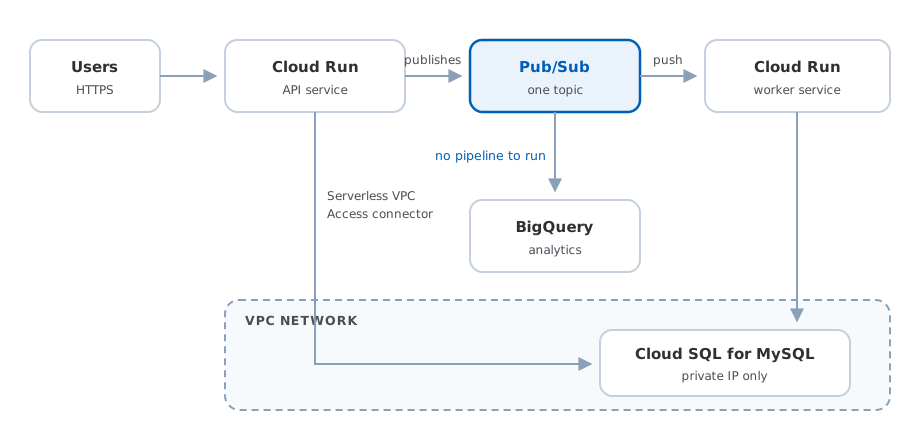
One topic with two consumers is what keeps the analytics side from ever touching MySQL.
Nothing else deploys this easily
The first time I put something on Cloud Run I assumed I had skipped a step. I had an image sitting in Artifact Registry, I ran one command, and about a minute later there was a URL with a valid certificate answering requests. I went back through the docs looking for the section on attaching a load balancer, and there isn’t one, because there’s nothing to attach.
gcloud run deploy orders-api \
  --image=us-docker.pkg.dev/my-project/services/orders-api:1.4.2 \
  --region=us-central1
No cluster to create, no target group, no listener rule, and no task definition asking for
CPU in units I have to look up again every time. If the image doesn’t exist yet you can
point --source . at a directory instead, and Cloud Build will pick a buildpack, push the
result to Artifact Registry, and deploy that.
I’ve deployed containers on most of the platforms that will take them, and for this specific job nothing else is close. The comparison I keep making is ECS on Fargate, where the same container needs a cluster, a task definition, a service, a load balancer, a target group, a listener, security groups, and a few IAM roles before one request can reach it. I don’t think any single item on that list is unreasonable. The problem is that the total comes to most of a day, and you pay it again on the next project, and by the third time you’ve written a Terraform module to hide it from yourself. App Runner and Azure Container Apps both exist to close this gap and both get closer than ECS does, though neither quite lands in the same place.
What kept me using it is that the second deploy is as easy as the first. Revisions are
immutable, traffic between them is a flag, and moving ten percent onto a new one is
--to-revisions=orders-api-00042-abc=10 with the same command moving it back. On a small
team that’s the difference between actually doing canary deploys and meaning to.
Concurrency is worth calling out as well, because it’s a number you set rather than one you inherit. The default is 80 requests per container, so an application that spends most of its time waiting on a database isn’t billed as though every request needs a process to itself, which is exactly where function platforms get expensive for ordinary web workloads. Scale to zero covers staging and development too, and that quietly settles an argument I’ve watched teams have more than once about whether a second environment is affordable.
None of this gets worse when you put a VPC in the picture. The deploy command stays the same length and the URL still turns up a minute later. What gets harder is everything the container needs to talk to, once talking over the public internet stops being an option.
Getting Cloud Run into the VPC
Cloud Run services run on Google’s infrastructure rather than inside your network, so by default they can reach the internet and nothing else. The bridge is a Serverless VPC Access connector, which you attach to the service and point at a subnet. Egress traffic then arrives in the VPC as though it came from inside, which is what lets you talk to a Cloud SQL instance that has no public address at all.
The connector wants an unused /28 range, and it is worth understanding what it actually
is before you provision one. Underneath, it’s a managed group of VMs. You choose a machine
type from f1-micro up through e2-standard-4, and the throughput range that comes with
it runs from roughly 100 to 500 Mbps at the small end to 3,200 to 16,000 Mbps at the large
one. Scaling is bounded by a minimum of two instances and a maximum of ten, and the
minimum is the part people miss. Those two instances are running whether or not any
request is in flight, which means the always-on cost of a scale-to-zero architecture is
not zero. It’s whatever two connector instances cost, every hour, forever.
On the database side, giving Cloud SQL a private IP means configuring private services access first, which allocates an IP range in your VPC and sets up a peering connection to Google’s service producer network. Do this before you create the instance if you can. Turning private IP on for an existing instance restarts it, and once it’s on you cannot turn it back off.
I’d expect this whole layer to get simpler. A managed group of VMs sitting between a serverless product and your network is obviously a transitional design, and it’s the kind of thing Google tends to absorb into the platform eventually. For now the connector is the supported path, so budget for it in both the design and the bill.
The connection arithmetic
Here’s the failure that shows up in load testing if you’re lucky and in production if you’re not. Cloud Run scales by adding instances, each instance is a separate process with its own connection pool, and MySQL has a fixed ceiling on how many connections it will accept. Multiply those together and you can exhaust the database from an application that looks, from the Cloud Run console, like it’s behaving perfectly.
Google caps this at 100 connections per Cloud Run instance to a given Cloud SQL instance,
which sounds generous until you notice it’s a per-instance number and the instance count
is the thing that moves. The arithmetic you care about is your pool size multiplied by
your maximum instance count, compared against the max_connections flag on your Cloud SQL
tier. That flag scales with machine type and it is lower than most people assume, so look
it up rather than estimating.
Both sides of the multiplication are yours to set. Keep the pool small, because Cloud Run defaults to 80 concurrent requests per instance and a pool of three or four handles that comfortably for anything that isn’t doing long transactions. Then set a real maximum instance count on the service instead of leaving it at the default, which turns an unbounded scale-out into a bounded one. A request that waits 40 milliseconds for a pooled connection is a much better outcome than an instance that gets a connection refused and turns a traffic spike into an outage.
Pub/Sub for the work that shouldn’t be in the request
Anything slow, retryable, or not needed before the response goes out belongs behind Pub/Sub rather than inside the handler. That’s not a Google-specific idea, but the fit with Cloud Run is unusually good, because a push subscription delivers over HTTP and a Cloud Run service is already an HTTP endpoint that scales on incoming requests. Push traffic drives the same autoscaler your user traffic does, with no extra machinery.
Pull subscriptions are the other option and they’re the wrong one here most of the time. Pulling means a process that sits in a loop asking for messages, which is exactly the thing Cloud Run’s scale-to-zero model is built to avoid. You’d end up pinning an instance up permanently to poll a queue that’s empty most of the day.
For push, the pieces that matter are authentication and deadlines. Configure the subscription with a service account so Pub/Sub signs an OIDC token into the authorization header, and give that account the run invoker role on the worker service rather than opening it to unauthenticated traffic. On the response side, Pub/Sub treats 102, 200, 201, 202, and 204 as an acknowledgement and everything else as a negative one, so a handler that swallows an exception and returns a 200 has quietly thrown the message away. The acknowledgement deadline can run from 10 to 600 seconds and it needs to exceed how long your worker actually takes, otherwise Pub/Sub redelivers a message that’s still being processed and you get concurrent duplicate work.
One more thing worth knowing before you benchmark. Pub/Sub ramps push delivery with a slow-start algorithm, widening the window on success and narrowing it on failure, and it backs off between 100 milliseconds and 60 seconds when it sees too many negative acknowledgements. So a worker that fails intermittently doesn’t just retry those messages, it slows down delivery of everything else too.
Assume every message arrives twice
Pub/Sub is at-least-once, which is a property of the system rather than an edge case, and any handler that isn’t idempotent will eventually do something twice. On AWS I’d normally reach for a conditional write to DynamoDB for this. Here you already have a transactional database in the picture, which lets you do something better.
Put a table of processed message IDs in the same MySQL instance and insert into it inside the same transaction as the work itself. A duplicate delivery hits the primary key, the insert fails, and you roll back and return a 200 because the work was already done. The reason this beats a separate dedupe store is that the marker and the effect commit or roll back together, so there’s no window where you’ve recorded the message as handled but crashed before the work landed.
CREATE TABLE processed_messages (
  message_id  VARCHAR(64)  NOT NULL PRIMARY KEY,
  processed_at TIMESTAMP   NOT NULL DEFAULT CURRENT_TIMESTAMP
);
try:
    with conn.begin():
        conn.execute(
            "INSERT INTO processed_messages (message_id) VALUES (%s)",
            (message_id,),
        )
        do_the_work(conn, payload)
except IntegrityError:
    return "", 204  # already handled, acknowledge and move on
Prune that table on a schedule so it doesn’t grow without limit, and keep the retention window comfortably longer than your maximum redelivery window. Behind all of this, attach a dead letter topic to the subscription with a maximum delivery attempt count, so a message that can never succeed stops cycling and lands somewhere a person can look at it. A dead letter topic nobody has alerted on is just a slower way to lose data.
BigQuery, so nobody runs reports against MySQL
The request I get eventually, on every one of these systems, is that somebody wants to know how many of something happened last quarter broken down by customer. The path of least resistance is to point them at the database, or at a read replica, and that works for about six months. Then the queries get more ambitious, the replica starts lagging, and you find yourself capacity planning a transactional database around a reporting workload that has nothing to do with serving users.
The version I’d rather build routes analytics off the same Pub/Sub topic that already
carries the events. A
BigQuery subscription writes messages
straight into a table with no Dataflow job or streaming pipeline in between, which used to
be the annoying part of this design. You either map the topic’s Avro or protobuf schema
onto the table columns, or write the whole message body into a single data column and
sort it out at query time. Write failures go to a dead letter topic with an attribute
explaining why the row was rejected, which is how you find out about schema drift before
an analyst does.
Two things to keep in mind about that path. It’s at-least-once like everything else in Pub/Sub, so plan on deduplicating by message ID in a view rather than trusting the raw table. And because BigQuery bills on bytes scanned, partition the table on ingestion time from the start. Retrofitting partitioning onto a table analysts are already querying is a worse afternoon than doing it up front.
There’s a second path for the cases where you genuinely need current transactional state rather than the event history. BigQuery can reach into Cloud SQL directly with EXTERNAL_QUERY, joining a live result set from MySQL against a table that lives in BigQuery.
SELECT o.order_id, o.total, c.segment
FROM `project.dataset.orders_events` AS o
JOIN EXTERNAL_QUERY(
  "us-central1.mysql-connection",
  "SELECT id, segment FROM customers"
) AS c
ON c.id = o.customer_id;
That’s a useful tool and a bad habit. The federated query runs against your production MySQL, so every use of it puts analytics load back on the database you built this whole arrangement to protect. I’d use it for small dimension tables like the one above, where you want the current value of an attribute, and I’d keep facts on the BigQuery side where they belong. It’s read-only, it’s slower than querying BigQuery storage, and a single query is limited to ten unique connections, so it isn’t going to carry a real reporting workload anyway.
What this costs when nothing is happening
Scale to zero is half true here, and it’s worth being precise about which half. Cloud Run really does go to zero, Pub/Sub costs you nothing when no messages are flowing, and BigQuery storage is cheap enough to ignore at these volumes. Those are the parts that behave the way the brochure says.
The other half is the VPC connector at its two-instance minimum and the Cloud SQL instance itself, both of which bill continuously whether or not a single request arrives. That’s a standing monthly charge underneath an architecture people describe as serverless, and it’s the same lesson as the OpenSearch Serverless cost floor I wrote about a few months ago. Serverless products keep turning out to have a number you pay before you do anything, and it’s usually the networking or the storage layer where it hides.
None of that makes this the wrong design. A couple of always-on components in exchange for never sizing an application tier is a trade I’d take most days. It just means the comparison against a small VM running the same app is closer than it looks, and if this system is genuinely small, the honest answer might be that it doesn’t need any of this yet.
Where the architecture earns its keep is when traffic is uneven, when the write path and the analytics path have nothing to do with each other, and when you want to add a third consumer of those events next year without touching the code that publishes them. Adding a subscription to a topic is a much easier conversation than adding a consumer to a database.
If you’re standing something like this up, or you’ve got one that’s started falling over under load and you want another set of eyes on it, please reach out.